~ Tips for making your life easier and less expensive ~

Sunday, January 10, 2010

Can ClearPlay Survive?

== UPDATE May 2016 ==
This is a very old post, but people occasionally stumble upon it, so I'll mention that I've moved on to VidAngel and haven't looked back. It's the service that ClearPlay should have become, at a much more affordable price point. https://www.vidangel.com?vip=tddmk9fr71
===================

I'm afraid that my favorite movie filtering technology is going to go out of business in the next few years. I hope I'm wrong.

The Filtering Controversy

I know that there are plenty of people who think that filtering content from media is silly, unnecessary, or outright wrong (for violating the artist's control over his art and other such nonsense). This post will hold no interest for such individuals. This is not an apologetic for filtering, and it is not intended to spark a debate on the topic. I've been amused--but mostly baffled--by those who find posts like these and use the comments to rant about filtering and those who use it.

What ClearPlay Is

My first experience with television/movie filtering technology was with TVGuardian. It's a neat technology that "reads" the closed captioning signal and mutes the audio signal when it detects a foul word. Years ago, TVGuardian offered a simple box that could be attached inline with any device that could send closed captioning plus audio (pretty much any VCR, cable line, or DVD player years ago). The company has since stopped production of that box in favor of embedding its technology into a few devices, from which it can be activated for a one-time fee.

TVGuardian's technology has an inherent flaw: it is 100% dependent upon the presence and accuracy of the closed captioning signal. This means that at best, filtering success is good but unpredictable; at worst, it is completely absent (such as when a studio foregos the closed captioning signal on its DVDs in favor of subtitles). I wanted something better.

Along came ClearPlay, a technologically superior solution that could not only mute inappropriate audio with great accuracy, but could also instantly skip scenes that a family may want to avoid (violence, sex, disturbing, etc.). The solution requires a ClearPlay-enabled DVD player, which accepts loading of per-movie filters. These filters are created by humans who actually watch the movies, and categorize each frame for both content and severity. Accuracy and flexibility are superb. Want to watch The Dark Knight with all the violence but zero cursing? You can. Want to watch it with just moderate filtering of the violence? No problem. (Actually, The Dark Knight's bloodiest violence is off-screen, and its language is fairly mild.) Or how about cutting out that "why would they put that in there" sex scene in a movie you want to watch with some friends? ClearPlay can do that too, with ease.

In spite of the $80+/year subscription fee that the labor-intensive nature of their solution necessitates, ClearPlay won my business because it appeared to be the best option in a very small class of filtering products. And it managed to survive even when its few competitors started biting the dust. While competitors' business model of selling edited copies of DVDs got squashed by studios, ClearPlay's method gained legal protection under the Family Movie Act 0f 2005.

Signs of Trouble

With legal protection and a dwindling field of competitors, one might expect ClearPlay to have charged forward and established a robust business. But as of early 2010, they appear to be heading toward extinction. And the core concept itself isn't the problem. Here are the top reasons I think ClearPlay's demise is near, and each one represents an opportunity for the company to turn things around, if there's still time.

  1. Slow technology adoption. In late 2009, after up-converting DVD players had settled into a low $50-70 range and the Blu-Ray format finally began making serious headway in the retail market, ClearPlay announced their own up-converting DVD player at $120. Here's my bid for understatement of the year: in the world of technology, it's generally bad to be late to the market and charge double what retailers are charging for a similar (and probably technically superior) product. ClearPlay needs a Blu-Ray option yesterday, and at a reasonable price. Even those willing to spend $80/year for a filter subscription may not be willing to pay a premium for the hardware too.Then there's the matter of getting filters onto the DVD player. A few years ago, it was via CD. A subscriber downloaded the ever-changing set of filters over the Internet and burned them to a CD, which was then inserted into the DVD player for loading the filters into internal memory. To make it even less convenient, the filters were broken down into 4 "volumes"--one per CD. Today, filters are downloaded onto a flash drive, which is much more convenient. But even that seems antiquated today. ClearPlay has control over the hardware and software on their players. Why then can't the player have an ethernet port or wi-fi card for automatic loading of filters over my home network? The short-lived modem-based player offered some hope for those who still used landlines, but was again just another example of ClearPlay being behind the times.

    Additionally, ClearPlay has been silent (on Twitter, Facebook, and their possibly abandoned news page) on how they plan to remain viable in the future of the movie industry, which appears to be coming in the form of downloadable and streaming movies. There's some speculation that even Blu-Ray itself may not have the luxury of a long lifespan like VHS and DVD had, due to the speed with which Internet delivery of movies is becoming viable and accepted. I believe ClearPlay should have sought funding (via angel investors or perhaps lifetime subscriptions) to aggressively find a solution to remain viable with these technologies emerging; but given ClearPlay's history, I'm not sure anyone would have been willing to gamble on them.

  2. Hardware quality issues. My fourth ClearPlay DVD player is being shipped to me as I write this. My first was a CD-based one, which was too inconvenient. I don't recall how reliable it was. My second was a 007-USB model. That one was (and still is) flaky; it has trouble reading DVDs quite a bit of the time, and has an abnormally low tolerance for scratched DVDs. So when the 427-USB model became available on clearance at a local Christian bookstore, I bought it, hoping for a better experience. Sadly, this model appears to have had the same manufacturer as the 007-USB, and it completely quit after 9 months. It simply will not power on at all. When I called ClearPlay to obtain a replacement, I was pushed toward upgrading to the new 747-HD; the support rep even said that although they could send me a refurbished version of the 427-USB, I might be calling them again in a few months. (Some brief research on the web quickly reveals that I'm not the only one having issues with ClearPlay players.) I'm hoping that the new 747-HD represents a substantial improvement, but I've already seen a couple of negative comments in spite of the rep's claim that a different manufacturer is handling these.

  3. Mediocre support policy. I've had to contact ClearPlay support a few times over the years, and while the reps are generally cordial, service hasn't been stellar. When I called about my broken 427-USB, I was told to push the power button rapidly 20 times (?). When that didn't work, I was strongly urged to upgrade to the 747-HD player at a reduced price of $70 instead of getting a refurbished replacement unit. They were going to charge me shipping if I didn't buy during the last day of their free shipping promotion, and I'm being forced to pay for return shipping of the defective player. This is not the way to handle a long-time customer's problem with a defective player. If there were any competition in this market, the competition would have gotten my business after that.

  4. Limited brand awareness. ClearPlay had DVD players in Target, WalMart, and Best Buy for a short time. That was an important move. But about a year after the RCA-branded player that WalMart was carrying became discontinued during a patent dispute, ClearPlay could no longer be found in those major retail stores. Being on Twitter and Facebook to facilitate viral marketing is a good idea, but it may not be enough, particularly given their other issues.
I believe ClearPlay needs to immediately pursue a partnership with a major retail chain again (I realize there's a chicken-and-egg thing going on here; a retail chain may not be interested until ClearPlay becomes popular, and ClearPlay may not become popular until a retail chain picks them up). As a result, they may be able to drive up the number of subscribers, thereby generating enough revenue to address hardware issues, develop a plan for getting and staying current with technology, and drive down prices to grab even more subscribers. In this age of social networking, a large, satisfied subscriber base is one of the best marketing tools a business can have.

In spite of my complaints, I'm grateful for what ClearPlay brings to the table, and I truly hope the company can survive and succeed. If they can address the issues mentioned above, and consistently bring consumers a reliable and affordable option for content filtering, I'll be a happy customer for a long time to come.

Saturday, May 19, 2007

A Solution for Countertop Stains

This isn't exactly original, but I was very glad to have been given this tip, so I'm passing it along...

If you have a run-of-the-mill countertop and have had problems with staining, try baking soda and vinegar to clean the stains. Coffee stains in particular are a challenge to get rid of with standard cleaners. Just shake some baking soda onto the stain, then add some vinegar or lemon juice. Let it sit for a minute or two, then use a paper towel to scrub. This solution worked when others failed, and I no longer think I need to replace my countertop anytime soon.

Use discretion, of course. Certain countertops should probably not be cleaned with this mildly abrasive solution, and certain finishes may be dulled when using this method. I recommend using it only if a slightly dulled surface would look better than the stained surface that you currently have.

ClearPlay More Accessible Than Ever

In an earlier post, I wrote about a content-filtering solution for DVD movies, called ClearPlay. Target stores now carry the latest ClearPlay-capable DVD player, and the cost is reportedly $49.99. The catch? It sounds like it's this week only. Here's an email I received today from ClearPlay:

"This week you can get ClearPlay's new USB DVD Players at Target Stores for only $49.99! That's a lot cheaper even than ClearPlay's website. And even better, the Target deal comes with a FREE trial membership, FREE USB FilterStik, FREE 2200 Filters and a special price on a one-year ClearPlay membership. Plus, you get ClearPlay's legendary satisfaction guarantee and outstanding customer service.

And this is not just a run-of-the mill DVD Player. It's got Progressive Scan, multi-format playback, PAL and NTSC conversion, Component/Composite Video, S-Video, and both Optical and Digital Audio Outputs. This is the real deal."

This is a great deal. If you've considered buying ClearPlay before, it looks like now is the time to buy. And if you want to learn more about ClearPlay, watch this video which does a mediocre job of explaining how ClearPlay works.

Wednesday, April 25, 2007

Suck It Up

Whether you're clumsy, a pet lover, a parent, or a clumsy parent who loves pets, you'll have an occasional need to lean the carpet in your home. You have 4 options:
  • Spray/foam carpet cleaners found with the other cleaners in your local store. Spray the cleaner on the carpet, wait a few minutes, then blot the spill.
  • Bissel SpotBot. I haven't used one, but it looks like you fill the thing with cleaner and water, set it on the stain, and let the SpotBot do the work.
  • Upright carpet cleaner. Similar in size and shape to a vacuum, but like the SpotBot, requires cleaner and water.
  • Professional carpet cleaner. Hire somebody to come with heavy-duty equipment to clean your carpet, or rent the heavy-duty equipment.

You might think that the choice you make will depend on your need; are you cleaning a small spill, or cleaning an entire room? But I'm recommending that one solution - the personal vacuum-size carpet cleaner - is the safest and most economical solution for virtually any need.

I've tried the spray carpet cleaners. At best, they're moderately effective. At worst, they can bleach your carpet, leaving a permanent spot that cannot be easily or inexpensively repaired. Been there, done that. You might think you're saving money by buying a $3 cleaner instead of a machine, but how much will it cost to repair that bleached spot on your carpet?

The SpotBot is a good idea, but it delivers very little flexibility for the price. You can't use it to clean an entire room.

The upright, vacuum-size carpet cleaner doesn't bleach your carpet, is much more effective than the spray carpet cleaners, and is not limited to only cleaning small spots. The reason it's dramatically more effective than the spray cleaners is simple: the brushing and sucking of the machine is a much more effective method than pressing down on wet carpet (which is essentially what you're doing when blotting the spill after the spray cleaner has done its thing).

I've heard good things about professional carpet cleaners and rental equipment, but those both incur per-use costs. At $155 (the price I paid for the Hoover F5914-900 SteamVac), a personal carpet cleaner remains the best value long-term. Admittedly it's a pain to haul out the SteamVac for small spills, but it's worth it considering the alternatives.

It's About Time

If you're fastidious about your timepieces being in sync, this post is for you. If you're normal, it's not.

I love the concept of atomic clocks, atomic watches, and any other timekeeping device that keeps time accurate to the fraction of a second (such as my GPS receiver). At my workplace, we use a technique for keeping our servers and PCs in line with the official U.S. time, and I was delighted to find that I could do the same at home. I'm running Windows XP Professional Service Pack 2; I'm not sure which Windows version started supporting this feature using the method described below.

  • Double-click the clock in your system tray (or open Date and Time in your Control Panel).
  • Click the "Internet Time" tab.
  • Check the "Automatically synchronize with an Internet time server" checkbox.
  • In the Server box, type time-a.nist.gov (time.nist.gov should work too, but as of tonight, it wasn't working; maybe one of NIST's servers is down).
Your computer will now synchronize with the National Institute of Standards and Technology, a government agency that keeps the official U.S. time.

Tuesday, April 10, 2007

Freeware Feature: GridMove

Purpose: Quickly and optimally arranging windows on your screen
Web site: http://jgpaiva.donationcoders.com/gridmove.html
Skill level required: Beginner to Intermediate

Although the efficiency benefits of using multiple monitors are becoming well-known, and although multiple-monitor configurations are more tenable than ever, you might be stuck with a single monitor for one reason or another. I've only recently been able to convince my employer that multiple monitors is a solid investment for power users in particular, but I know it will be years or decades before they let me purchase dual monitors for the majority of the staff.

So if you're stuck with a single monitor, how can you work efficiently? For that matter, perhaps you have dual monitors but still want to make the most of the space you have (after all, even two monitors isn't enough, right power users?). Well, you could resize your windows and arrange them perfectly to maximize the utilization of your screen space. That's time-consuming though, which kinda defeats the purpose of your efficiency attempts.

The solution is a simple program called GridMove. This program is difficult to explain, but this visual helps. GridMove "splits" your monitor into multiple rectangles. Drop a window onto one of these rectangles, and GridMove takes care of the resizing for you. Basically, GridMove lets you predefine a workspace layout, and then it takes away the work of the window resizing. You get the benefits of fastidious window management, without the time-consuming labor that is typically required. I now use this program daily at work, and it became particularly useful once a friend pointed out the keyboard shortcuts.

Here's a bonus for you: whether or not GridMove floats your boat, you may want to try GroupBar from Microsoft. GroupBar is in the same basic category as GridMove; it helps you manage your open windows so you can be more efficient.

Wednesday, March 21, 2007

Flashlight Insight

Flashlights are one of the hobbies of nearly all men, just like guns, trucks, and tools. Our fascination with these items is difficult to explain, as is my desire to test my flashlights to see how each of them performs.

Note that this test does not take into account the high-end flashlights used by hunters, police officers, etc. So if you're the kind of person who wants or needs the $60-400 flashlights made by SureFire or similar brands, this post may not be for you. This is simply a brief evaluation of the kinds of everyday flashlights you can purchase at your local store.

Tip: Not all LEDs are the same. LEDs come in different color temperatures and wattages. Two basic types of LEDs were tested here.

Test details:

  • All flashlights had new Rayovac batteries, except for the Bushnell 1-watt Luxeon LED, which takes a lithium ion battery. That flashlight's battery was barely used prior to this test.
  • A Canon SD400 was mounted to a tripod and used to take pictures of the same location under different lighting conditions. The picture on the right was taken during the day under a mixture of natural and artificial light. Compare it with the results table below.
  • The descriptions of the flashlights are as follows:
  • 1: Traditional flashlight with traditional bulb. Takes 4 AA batteries. Bulb was old. Approximate value: $10.
  • 2: Mini Maglight with traditional (pre-LED) bulb. Takes 2 AA batteries. Bulb was old. During test, beam was focused as narrowly as possible. Approximate value: $10.
  • 3: LED flashlight with 1-watt Luxeon LED. Takes 3 AAA batteries. Approximate value: $25.
  • 4: Bushnell LED flashlight with 1-watt Luxeon LED. Takes CR123A, 3-volt battery. Approximate value: $40.
  • 5: Low-end 9-LED flashlight. Takes 3 AAA batteries. Approximate value: $7.

Images:
Click on a thumbnail to see a larger version of the image.


#


Flashlight


Straight on view


Room test


1


2


3


4


5

Observations:

  1. The traditional flashlight is best for long-distance use. It has a dominant hotspot as well as a decent amount of surrounding light. The color of the light is very warm, as with most incandescents.
  2. The Mini Maglight was disappointing. I don't see much use for it.
  3. The Luxeon 1-watt LEDs performed well. They have a much whiter light than the incandescents, and they do not suffer from the same degree of blue tint that the low-end LED light does. This type of flashlight is an excellent compromise, and would be great for a variety of applications.
  4. Overall, the Bushnell lithium-powered flashlight was my favorite in this test, producing an adequately strong hotspot with plenty of surrounding light. Its performance is impressive given its size. However, if I had to take just one flashlight with me when going on a trip, a walk in the woods, etc, it would be the other Luxeon LED flashlight. The reason? 3 AAA batteries are cheaper and easier to find than a lithium battery.
  5. The small 9-LED flashlight produced no discernible hotspot, and had an unmistakable bluish tint. It would be ideal for reading (book, map, etc.), given its small size, lack of a hotspot, and low power consumption.

The Diet Ice Cream That Beats Regular

A few posts ago, I asked which generic products you've encountered that are actually better than name brand products. Not just acceptable, mind you; but good enough that you'd prefer to buy the generic.

We'll do one better on this post. Have you found any diet products that are actually better than their "regular" counterparts? I know of only one example: Edy's Slow Churned ice cream. I don't think that Edy's claim of "One Day, All Ice Cream Will Be Made This Way™" is an overstatement.

Not only does this ice cream have 1/2 the fat and 2/3 the calories of regular ice cream, its texture actually surpasses that of any other ice cream I've had. There's one caveat though; I'd only say that about the vanilla-based flavors. The chocolate-based flavors are still great, but I'm not sure I'd say they're better than their regular counterparts. The flavor that I'm frankly basing most of this claim on is Cookie Dough.

Edy's can be expensive (not insanely expensive like Ben & Jerry's or similar products), so I feel compelled to defend my reputation of frugality by saying that I try to buy when it's on sale for $2.50 - $3.00.

Monday, March 19, 2007

Saving Money on Cost-Saving Products

I offer my apologies (just 4 of them; I'm keeping my remaining 98 for the future) to my readers who live in warm climates. This is another "just for the northerners" post.

Stores that carry products for winterizing your home are currently eager to get rid of them as they begin stocking their shelves with spring items. If you have considered doing some winterizing--such as covering windows with plastic sheeting--but have been turned off by the cost, now is the time to buy. In the past, I've been able to buy window insulation kits like the one pictured for $1 per box. Just stick them in a storage closet or your basement, and you'll be prepared to lower your heating costs next winter.

Friday, March 16, 2007

Detective Work Through the Power of Community

I received a call on my cell phone today from a number I didn't recognize. I didn't answer. Several hours later, I received another call from the same number. Again, I didn't answer, even though my curiosity fought me. The caller did not leave a message. For me, such a mystery is difficult to let go, so I tried a reverse phone number lookup on the web.

None of the free options yielded any results, and I'm too cheap and skeptical to pay for any reverse phone number lookup service. Between my wallet and my curiosity, my wallet always wins.

Thankfully I stumbled upon http://whocalled.us/. In an interesting application of collective intelligence, anybody can report the results of phone calls that they received from any source. For example, I could hop on http://whocalled.us/ an report that number 555-439-8821 called me twice in a day without leaving any messages. It would be even more useful if I had answered the call, found out who was calling and why, and then reported it on this site. I was appreciative that 35 people had taken the time to report the number that called me today, and some of those people had actually answered the calls--or returned the calls--and found that it was a spam type call from a college.

The next time I have a call from a number I don't recognize, I'm going straight to http://whocalled.us/ to see if it's been reported there. http://800notes.com/ seems to be the same type of service, though they listed 0 results for my search today when http://whocalled.us/ reported 35.

Monday, March 12, 2007

Save Time and Money on Your Garden This Year

My yard is slowly turning from white to green this week, as warmer weather chases the snow away. And not a moment too soon. I look forward to getting outside again, even if it does mean I have to start mowing my lawn. If only I had a robotic mower.

Whether you have a backyard paradise or just a small garden, watering you plants can be time-consuming and expensive. Even if you manage to remember to water, you have to make it a point to actually do it. And then, you have to watch your water bill go up, in part because traditional watering techniques can be very inefficient. Next time you run a sprinkler, watch how much water doesn't reach your plants.

Two tools can help alleviate these problems.
  1. A watering timer. A watering timer connects to your outdoor faucet or a hose, and allows you to schedule your watering times via a digital or analog clock. I paid full price (about $29) for mine because I bought it in the spring. Our local WalMart sold them for $10 each at the end of the season. It sure is nice to set the timer and forget about it. Even if I'm on vacation, my plants are getting watered. And more importantly, my plants are getting watered even on days when I'm being lazy.
  2. Soaker hoses. A soaker hose is a porous hose made of rubber. When the hose is filled with water (it's capped on the end opposite the faucet), water seeps out of the hose and into the ground. The soaker hose can--and should--be buried under mulch; you never see it. This watering method allows you to water only the regions you want watered, keeping your watering costs as low as possible.

Tip 1: My research indicated that you should connect no more than 100 feet of soaker hose together. If you find anything different, feel free to comment.

Tip 2: Get more bang for your buck out of the watering timer. Connect a splitter to your timer, allowing you to control up to 4 or 5 hoses. I used this method to split my soaker hoses into two 100-foot sections on the same watering schedule.

Thursday, March 08, 2007

Impressive Generic

Occasionally, a store brand item surpasses "good enough" and actually performs remarkably well. Sam's Choice plastic wrap (not Great Value plastic wrap) is one of those products for me. I realize a wiki would be a more appropriate venue for this question (as would a web site with more than a dozen readers), but I'm in search of other items that happen to be both inexpensive and of excellent quality. So what have you found?


Teeny Tiny Profit Margin

I have no intention of turning this blog into a "deals and steals" site, but this particular deal pops up occasionally, and it's pretty impressive. The Black & Decker DCM18S Brew 'n Go Personal Coffeemaker is just $9.99 again at Amazon.com. The included mug is worth $4-5 alone, and a permanent filter is included (also worth a couple of bucks). I can't imagine that Amazon or Black & Decker are making much money on this one.

I mentioned this product in an earlier post. In fact, the service featured in that post (apricealert.com) is the reason I know about this deal.

The last time the price dropped this low, it was only for about 24 hours. And yes, you have to spend $25 to get free shipping.

Saturday, March 03, 2007

Saving on Contact Lenses

With a little bit of effort, you can save a bundle on your contact lenses.

I found VisionDirect.com (part of DrugStore.com) to be a great place to buy contacts. Below is a comparison of VisionDirect.com to WalMart, where I got my eye exam.

VisionDirect.com

WalMart

Cost per box (Focus Night and Day)

$48.95

$62.84

Volume discount per box (4 or more boxes)

$1

NA

Coupon (see dealcoupon.com for current coupons)

10% off

NA

Processing Fee

$0.95

NA

Shipping

Free

Free

Delayed cash back from FatWallet.com

7%

NA

Total for 4 boxes:

$161.49

$251.36

I've actually done better than the above example (my actual cost after FatWallet.com cash back was $152.57 this year), but the example uses currently available deals. Also, depending on how Internet tax works in your state, you could very well save another $14 in taxes over WalMart. That means if you hit all the deals at the right time, and if you save the taxes, you could save around $113--or 45%--over WalMart for a 1-year supply of these contacts. Also, buying at VisionDirect.com might get you some drugstore.com "dollars," but I'm not sure.

Manufacturer's rebates are common as well, and are typically reseller-independent. But as always, don't completely depend on rebates. Ciba denied one of my recent claims even though I followed their instructions.

Thursday, March 01, 2007

Freeware Feature: MWSnap

Purpose: Taking screenshots / screen captures
Web site: http://www.mirekw.com/winfreeware/mwsnap.html
Skill level required: Beginner to Intermediate

Taking "pictures" of my desktop (screenshots or screen captures) is something my job often requires. It even comes in handy sometimes at home. You may already be familiar with two common methods of capturing a picture of your screen:

  • The PrtScn (or Print Screen) button. This button captures an image of your screen to your clipboard. After hitting this button, open up a photo editing program--or any program where you need to paste a picture--and hit the Paste button. Keyboard users prefer the keyboard shortcut CTRL + V for pasting.
  • ALT + PrtScn. This captures an image of only the active window on your screen. This is very helpful if you want to take a picture of a dialog box, for instance.

Sometimes you may require greater flexibility. Microsoft OneNote, which I won't take time to describe here, has a very cool screen capture feature. Right-click on its system tray icon, select "Create Screen Clipping," and you get to select exactly the portion of your screen that you copy to the clipboard. Very cool, very useful, and very simple. The problem is, I have OneNote only on my work PC, and buying a copy of that program simply for that feature would be overkill.

In my search for free software that simulated the screen clipping feature of OneNote, I found MWSnap. I tried some other software, and MWSnap was the one I liked the best. It has plenty of features to meet my needs, including a handy AutoSave option. If you're looking for a screen capture utility, give MWSnap a try.

No Wonder My Parents Complained When I Drank So Much Milk

Drink prices are good to keep an eye on when you're looking to trim your grocery bill. It's good to know, for example, that a glass of milk costs 8 times as much as a glass of water, or that orange juice costs 10 times as much as coffee.

The following chart shows my own calculations, and they're not perfect. For example, I'm assuming that tap water is free, whether heated or not. I'm also assuming that there's no waste, which there often is—especially for something like a 2-liter bottle of soda. Note that I'm using 12 ounces for each beverage, but that's primarily for comparison purposes.

Beverage

Cost per 12 oz.

Based on

Notes

Filtered water from pitcher

$.028

Pur pitcher and filters ($30 for the 2-stage, 1-gallon pitcher; $39 for 4-pack of 2-stage filters)

Assumes owner goes through 360 gallons with pitcher. Assumes claim of 40 gallons per filter is accurate.

Coffee

$.042

$6 for 39-oz. can.

Black only. Does not account for cost of coffee maker or filters. Based on 288 6-oz cups per canister. Tap water used.

Hot tea

$.077

$2.08/20-bag box

Based on 5 bags per brewed gallon; similar to (3) 8-oz. cups per bag. Assumes it's made from filtered water from pitcher.

Instant iced tea, pre-sweetened

$.102

$3.28 for Nestea mix in a 20-quart size.

Assumes 20% stronger tea than recommended. Assumes it's made from filtered water from pitcher.

Filtered water from half-liter bottles

$.104

$3.50 for 24-pack of half-liter bottles

Soda, 2-liter

$.178

$1 for 2-liter

Soda, 12-pack cans

$.229

$2.75 for 12-pack

Milk, 1%

$.230

$2.45/Gallon

Apple juice

$.246

$1.97 for 96-oz. generic, in plastic bottle

Fruit juice (5-10% juice)

$.257

$1.37/Half gallon

Price is similar for Minute Maid half gallons or Sunny Delight full gallons

Chocolate milk

$.288

$3.07/Gallon

Orange juice

$.422

$4.50/Gallon

Prices vary widely

Saturday, February 24, 2007

Creating a Good Password That's Easy to Remember

Conventional wisdom tells us that a password needs to be complex to be strong. Complex means that the password includes different character types--numbers, uppercase letters, lowercase letters, and symbols. And of course, the password is preferably not a real word, and it better not be something like Fluffy-2. (I'll give you one guess about that person's next password.)
Don't get me wrong; a complex password is indeed a good idea, until it gets so complex that you have to write it down. Once you do that, you've made your password more discoverable.

There are a couple of articles from Microsoft that talk about another option: long passwords. The longer, the better. (In this article, search for the section called, "Myth: Passwords Must Be Complex to Be Strong." In this other article, search for the section called, "What should I do to protect my passwords?") One easy way to create a really long password is to use a passphrase. This is preferably a phrase that you can easily remember, but may not make sense to somebody else. For example, "The bird wasnot inthekitchen's waterbed." After reading the articles mentioned above, you'll understand why this is such a good password. Even something simpler, such as "I'mgladBobreturnedwiththemilk" would take a long time to crack.

I'm not saying complex passwords are a bad idea, nor am I saying that long passwords are a complete alternative to complex ones. The best password is both complex and long. I.T. pros and others protecting high-security accounts should still strive to use the most complex passwords possible, and a password utility like PINs (see previous post) can help. But for the regular Joe wanting to keep his accounts secure, a long password--or passphrase--may be the best option.

Freeware Feature: PINs

PINs

Purpose: Store passwords in a secure database
Web site: http://www.mirekw.com/winfreeware/pins.html
Skill level required: Beginner

Deep down, you know that you shouldn't use the same password for so many of your accounts. You also know that you should use more complex passwords, rather than just incrementing a digit at the end of your pet's name every time your password expires. The problem is, how are you going to remember all those passwords?

The answer is PINs. Actually, the answer is: an encrypted password database. PINs just happens to be a fantastic and free one. With solid encryption and superb portability (no installation is required), PINs is my password database of choice for home and work.

A bonus is that PINs can generate passwords for you. So it can generate a password like P!+tZ-(9M, and you don't have to worry about remembering it. Or better yet, we can devise a password that's much more difficult to crack and is easier to remember. But you'll have to wait for another post to hear about that trick.

Friday, February 23, 2007

Leave Me Alone!

Another tip for the non-geeks out there (because the geeks already know this one):

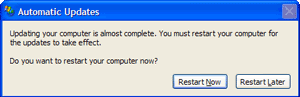
As important as Windows Updates are, there are times when Windows wants to reboot following the updates, and you're in no mood to reboot your computer. You'll get to it soon enough, but you want to get rid of the nagging reminder that pops up every 5 minutes:


There are a couple of ways to handle this, but here's one of the easiest:
  • Click Start
  • Click Run
  • Type "sc stop wuauserv" without the quotes, and press Enter
You've just stopped the Automatic Updates service. The yellow shield in your system tray will disappear, and you won't be nagged every 5 minutes.

Sunday, February 18, 2007

Keeping It Clean

Now here's a predicament: You enjoy movies and television shows, but you don't appreciate foul language and indecency that is often found in them. So what can you do? The way I see it, the options can be categorized as follows:

  1. Avoidance. This entails watching only those movies and shows without the offensive content. I understand and respect this choice, but it sure limits your entertainment options.
  2. Manual censoring. This entails strategic use of the fast forward and mute buttons. The drawback is that it's difficult; you could get burned. This is particularly unacceptable when you're watching a movie with your family.
  3. Automated censoring. This is my favorite option. It's more accurate and less stressful than manual censoring, but it's not free.
Manual Censoring

To effectively fast forward or mute unwanted content, you need to first educate yourself on the movie's content. I know of three free services that can help you in this matter:

  1. Screen It (http://www.screenit.com/). This site evaluates 15 different content categories for each movie, including Alcohol/Drugs, Blood/Gore, Violence, and more. After reading through the categories that are of interest to you, you will be well-prepared to avoid any content that you don't want to see. This site is advertisement-heavy unless you're a subscriber. I personally bookmark the search page and use a popup blocker; I find the site most usable that way.
  2. PluggedIn Online (http://www.pluggedinonline.com/). This site from Focus on the Family reviews movies, with a focus on appropriateness of content. I haven't used it much, but I heard about the site from a relative. It's worth a look.
  3. The Dove Foundation (http://www.dove.org/). The mission of this foundation is "To encourage and promote the creation, production, distribution and consumption of wholesome family entertainment." Movies are reviewed for their family-friendliness.
Automatic Censoring

There are a couple of tools that can perform automated censoring. The tools differ in several ways.

  • TVGuardian (http://tvguardian.com/). The TVGuardian is a device (or embedded functionality in a TV or DVD player) that filters out only foul language. Its strength and weakness is that it does so by monitoring the closed captioning for offensive words. There are some options in the system, such as how strict to be and whether to display modified closed captioning text when the audio is muted. TVG has been expanding its product line. I've personally used only one of their old devices similar to the Model 301 currently on their site, but other options are now available. Keep in mind that some of these Pros and Cons may be outdated if their technology has recently improved.
    • Pros
      • Works on anything that's closed captioned, including television, DVDs, and VHS tapes.
      • Cost ($70 for basic unit). No ongoing costs. Once you purchase and install the unit, it can run for years.
    • Cons
      • Only language can be filtered.
      • Not all movies—even DVDs—are closed captioned. If the production company (such as Universal Studios) decides that subtitles are a good substitute for closed captioning, the TVGuardian won't work.
      • You miss too much. TVGuardian mutes the audio when an offensive word is detected in the closed captioning. But closed captioning can show an entire sentence at one time. So to mute a single word, TVG has to mute a lot of audio.
      • Its accuracy is limited. If the closed captioning isn't completely in sync with the audio, the TVG can't do its job.
      • The replacement words are ridiculous. TVG replaces the word "screw" with the word "doodle" on screen (when that option has been selected). Some of the other word substitutions are equally silly.
      • The system cannot discriminate. A word like "screw" can be used innocently or offensively. TVG doesn't know the difference. So try watching a home improvement show with TVG, and you're likely to miss quite a bit.

  • ClearPlay (http://www.clearplay.com/). ClearPlay-enabled DVD players can filter language and much more. With this system, the DVD players use DVD "filters" or "masks" to block out unwanted content. The DVD is never actually modified; ClearPlay just fast forwards past unwanted visual content, and mutes unwanted audio content. These filters are created by ClearPlay staff, so the process is much more labor intensive than the TVGuardian technology. Therefore, the ClearPlay model requires a subscription (although an option does exist for buying individual filters, which may work well if you don't watch many movies). The benefits include improved accuracy and a wider range of content categories. Unfortunately, this technology is currently limited to DVDs.
    • Pros
      • Accuracy. The filters are created by humans who watch the movies and pinpoint (to the second) where the undesirable content is.
      • More than language is filtered. Scenes of indecency, violence, or drug use can be completely skipped.
    • Cons
      • DVD only (and you need to buy a ClearPlay-equipped DVD player)
      • Cost ($85-100 for DVD player, $80/year for membership –but other payment options exist)
      • Procedure. With my early ClearPlay DVD player, I had to burn the filters onto CDs, and the filters needed to be loaded for each movie I wanted to watch. It's cumbersome. Obtaining the filters by modem or USB—which you can do on some of their players—would be much easier.
      • Limitations. Because these filters are created manually, you'll encounter movies that do not have filters. What's worse is that a different filter often has to be created for each edition of a DVD (widescreen, full screen, director's cut, special edition, etc.). You have to be sure you're renting/buying the edition that ClearPlay created a filter for.
Conclusion

A combination of these tools may be your best option. With the right tools, you can open up your entertainment options while keeping offensive content out of your home.